









In modern SEO, filtered listing pages often represent both an opportunity and a challenge. They are essential for user experience, allowing visitors to refine products or content by attributes such as color, size, or category, but they can easily become problematic for search engines if not properly managed. Duplicate content, crawl inefficiencies, and messy URL structures are common issues.
This is where Kleecks provides a structured and powerful solution. In this product corner article, we’ll explore how Kleecks enables the “staticization” of filtered listing pages and transforms them into crawlable, indexable, and SEO-friendly assets. We will walk through the full workflow: from defining page types to configuring staticization rules, applying regex filters, and finally enhancing URLs with friendly rewrites.
The Challenge of Filtered Listing Pages
Filtered listing pages are generated dynamically based on query parameters in the URL. For example, a product listing page might look like:
/products?color=blue
While this is useful for users, search engines may struggle with:
- Crawling too many URL variations
- Understanding which pages should be indexed
- Handling duplicate or near-duplicate content
- Assigning proper canonical authority
Without control, these pages can dilute SEO value instead of enhancing it.
Kleecks addresses this by introducing a structured process to “staticize” filtered pages, making them predictable and SEO-safe while preserving their dynamic flexibility.
Step 1: Defining a Dedicated Page Type
The first step in the workflow is to define a dedicated page type for filtered listing pages. This is a foundational concept in Kleecks’ URL management system.
By creating a specific page type, you are essentially grouping all filtered versions of a listing page under a unified rule set. This allows Kleecks to:
- Separate filtered pages from core category pages
- Apply consistent staticization rules
- Track performance at a structural level
Step 2: Configuring Staticization Rules
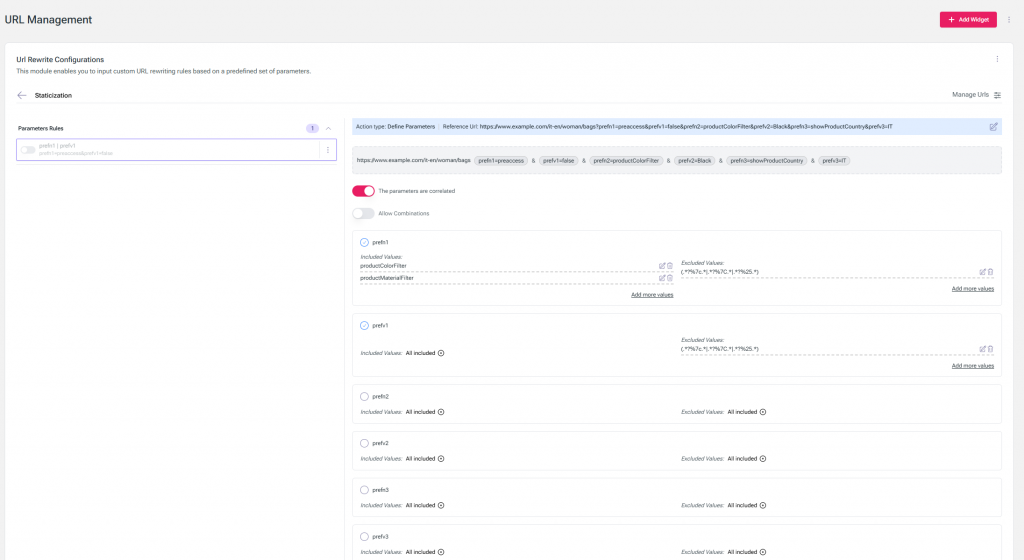
Once the page type is defined, the next step is to open the URL rewrite configuration widget and navigate to the staticization tab.
Here, you can create a new rule by selecting:
- The page type (your filtered listing page type)
- A sentinel URL (a representative example of a filtered page structure)
The sentinel URL is important because it helps Kleecks understand the pattern of URLs that should be managed under this rule.
After defining the rule, you move on to one of the most important steps: selecting which GET parameters should be staticized.
Step 3: Selecting GET Parameters and Applying Filters
Filtered listing pages are typically driven by query parameters such as:
- color
- size
- brand
- price range
In Kleecks, you can choose which of these parameters should be converted into staticized, SEO-recognizable elements.
For example, you might select the parameter:
color
But the real power comes from the ability to refine this selection using regular expressions. This allows you to control which values are eligible for staticization.
For instance, you can:
- Include only specific values (e.g., only “blue”)
- Exclude certain values (e.g., ignore “green”)
- Define complex matching rules for large-scale filtering strategies
This level of control ensures that only meaningful, SEO-relevant filter combinations are exposed to search engines.
Step 4: Canonicalization and Sitemap Inclusion
Once the rules are applied, Kleecks automatically handles a critical SEO step: canonicalization.
Filtered URLs become canonical versions, meaning search engines are instructed that these pages are valid and preferred for indexing. This is true even if the original parameter remains in the query string.
This is particularly important because it allows:
- Filtered pages to be indexed without confusion
- Avoidance of duplicate content issues
- Clear hierarchy signals to search engines
Additionally, these URLs become eligible for inclusion in the sitemap. This is a major advantage, as it ensures that important filtered pages are discoverable and actively considered for indexing rather than being left to chance crawling.
Step 5: Enhancing SEO with Friendly URL Rewrites
While staticization already improves crawlability and indexing, Kleecks goes a step further by enabling friendly URL rewrites.
This feature transforms parameter-based URLs into clean, readable paths that are both user-friendly and SEO-optimized.
To implement this, you start in the global variables configuration widget.
Here, you create a custom variable—for example:
- Name: color
- Page type: filtered listing pages
Next, you define a CSS selector that identifies the active filter value on the page. This could be:
- A tag
- A class
- A data attribute
This allows Kleecks to dynamically extract the active filter value directly from the page DOM.
Step 6: Building the URL Structure
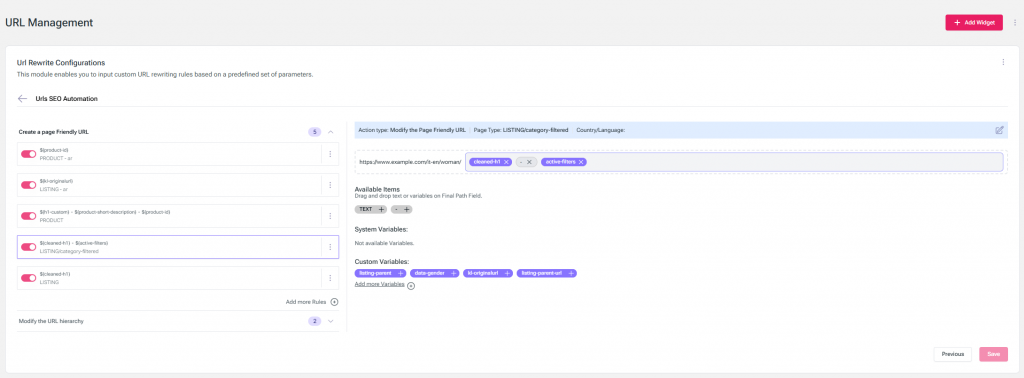
After defining the variable, you move back to the URL rewrite configuration widget and open the friendly URL tab.
Here you:
- Create a new rewrite rule
- Select the page type and language
- Open the drag-and-drop interface
This interface allows you to construct the URL visually. You simply drag the color variable into the URL pattern, placing it where it should appear in the final structure.
For example:
/products/color/blue
Instead of:
/products?color=blue
This transformation significantly improves:
- Readability
- Crawl efficiency
- Keyword relevance in the URL path
- Overall site hierarchy clarity
The SEO Impact of Staticization and Rewrites
Even without applying friendly URL rewrites, Kleecks already ensures that filtered pages are:
- Staticized
- Canonical
- Eligible for sitemap inclusion
This alone is a major SEO improvement, as it prevents filter-driven chaos from affecting indexation quality.
However, when friendly URL rewrites are added, the benefits multiply:
- URLs become cleaner and more descriptive
- Site architecture becomes more hierarchical
- Keyword signals in the URL path are strengthened
- Crawl paths become more efficient and predictable
This combination allows SEO teams to fully control how filtered listing pages are interpreted by search engines while maintaining flexibility for users.
Conclusion
Filtered listing pages are often overlooked in SEO strategies, yet they represent a significant portion of crawlable site real estate. Without proper management, they can introduce duplication issues and dilute ranking signals. With the staticization and URL rewrite system provided by Kleecks, these pages become structured, controllable, and highly optimized assets.
By defining page types, configuring GET parameter rules, applying regex-based filtering, enabling canonicalization, and finally implementing friendly URL rewrites, teams can transform dynamic filter pages into a strong SEO advantage.
To see the process in action, you can watch the full demo here:
Kleecks Static Filter Demo Video
In a competitive search landscape, this level of control over filtered navigation pages is not just a technical enhancement, it is a strategic SEO capability.